Smarter survey setup, event-driven workflows, and on-brand analytics
Version 4.6.0 — March 12th, 2026
This release removes friction at every step of your feedback workflow. From the moment you create a survey to the way you automate and report, version 4.6.0 gives CX teams more control and less manual work. For teams managing high volumes of feedback, these changes add up fast.
The Problem
Setting up feedback collection has always involved too many steps. Creating a survey, then separately configuring its data source, then making sure everything stays in sync — each step introduced room for error and delay.
On top of that, workflows only triggered on new feedback, making them blind to updates. And when it came to reporting, every dashboard looked identical, regardless of your brand.
What's New in This Release
Surveys connected to sources from day one

One click to connect
When you create a new survey in Feedier, it now automatically links to a data source. A single "Create Source" button publishes the survey and generates the connected source in one action. No separate import step. No manual mapping.
Why it matters
Every minute spent on setup is a minute not spent on analysis. By collapsing two steps into one, your team gets to insights faster — especially when launching new feedback programs or iterating on existing ones.
Where to use it
- Launch a new survey and have its data source ready in seconds
- Push survey updates to the connected source with a single click
- Avoid misconfigured sources when setting up new feedback channels
- Reduce onboarding time for new team members managing surveys
This means you can go from survey creation to active data collection without leaving the workflow.
Workflows that react to feedback updates, not just new entries

Trigger on change, not just on creation
Workflows can now be triggered when feedback is updated, not only when it first arrives. Enable the "Trigger also for updated feedback" toggle in your segment trigger settings, and any qualifying update will fire the workflow automatically — with built-in protection against double-triggering.
Why it matters
Customer feedback evolves. A ticket gets escalated. A score changes after a follow-up. A category gets reassigned. Until now, those updates were invisible to your automation layer. This change makes your workflows responsive to the full lifecycle of feedback, not just its first appearance.
Where to use it
- Re-route feedback automatically when a severity score is updated
- Notify account managers when a key account changes their rating
- Trigger a follow-up action when feedback is re-categorized
- Ensure no critical update slips through your automation pipeline
This means you can build automation pipelines that stay accurate as feedback evolves, not just when it's created.
Brand colors applied across all analytics views
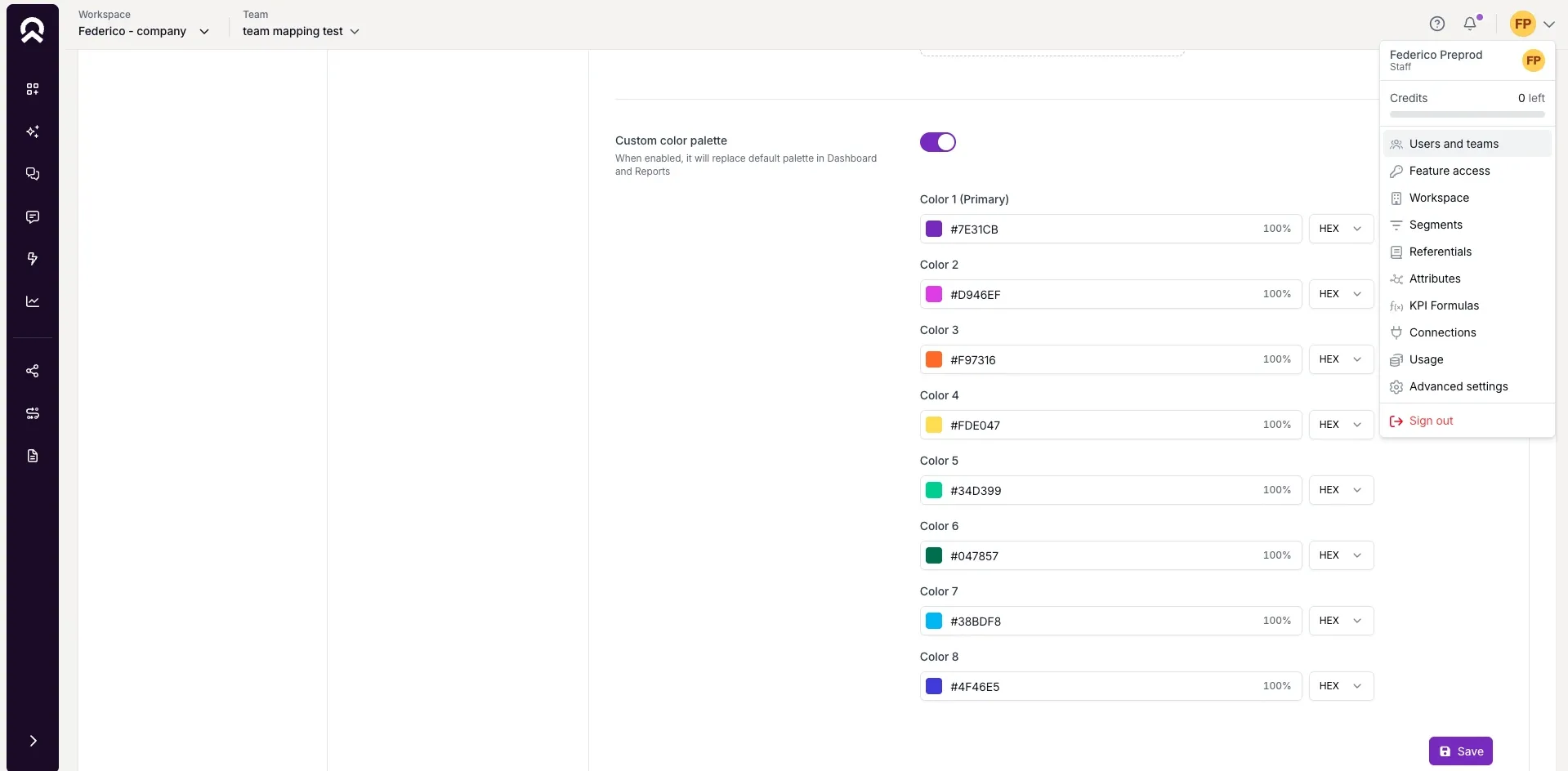
Your brand, consistently
You can now set a primary color for your team in Teams → Advanced Settings → Branding. That color is automatically applied across charts, benchmarks, correlation matrices, and feedback components — giving every report and dashboard a consistent, on-brand look.
Why it matters
When sharing reports with stakeholders or leadership, visual consistency builds credibility. Reports that reflect your brand identity create trust. Reports that look generic create friction.
Where to use it
- Apply your company's primary color before sharing a quarterly CX report
- Ensure all dashboards reflect your brand identity without manual formatting
- Present feedback analysis to leadership with professional, consistent visuals
- Align analytics outputs with your internal design standards
This means you can share reports that look like they belong to your organization, not just to a generic SaaS tool.
How to Access It
- Surveys Flow to Sources: Available when creating a new survey. Click "Create Source" to activate the linked data source.
- Workflow Trigger: Go to your workflow's segment trigger settings and enable "Trigger also for updated feedback."
- Branding: Go to Teams → Advanced Settings → Branding to set your primary color.
What This Release Changes for You
Version 4.6.0 is about removing the small frictions that slow down CX teams every day. Setup is faster, automation is smarter, and reporting is more professional.
Whether you're launching a new feedback program, managing complex automation pipelines, or preparing a stakeholder presentation, this release gives you more control without the overhead. The result is less time spent configuring, and more time spent acting on insights.
Try it in your workspace.
The Ultimate Guide to the Voice of the Customer 2025


Our articles for further exploration
A selection of resources to inform your CX decisions and share the approaches we develop with our clients.